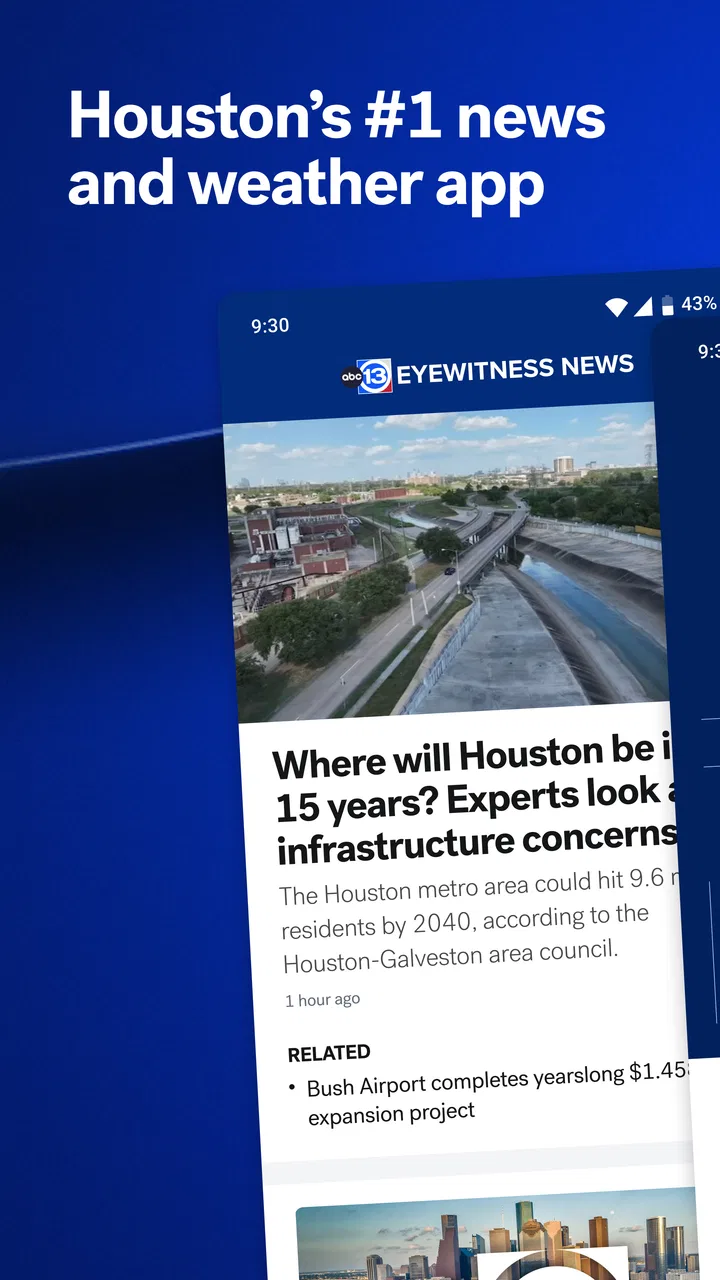
ABC13 Houston
- 4.1
- Rating
- 500.00K
- Installs
- Free
- Price

 Analysis by App-foxy
When I want local information quickly, I do not necessarily need a full national news service. I need to know whether weather is changing, whether something is happening nearby, and whether an update deserves my attention right now. That is the practical appeal of ABC13 Houston, a free news and magazines app from Disney that puts Houston-focused breaking news and weather alerts in one place.
After spending time with it, I see the app less as a replacement for every source of information and more as a focused local companion. Its strongest idea is customization: instead of treating every alert as equally important, it aims to let me shape the notifications around the information I actually care about. That can make a real difference on a busy day, especially when weather changes quickly or a developing local story affects a familiar route.
The app is available for everyone, which makes its audience broad, but its usefulness is especially clear for people who live in Houston, work there, commute through the area, or have family and property there. It has been available since May 17, 2013, and its presence on Android is well established, with over 500 thousand installs. Disney is the developer, and the app remains free to use.
You May Also Like

 Blood Strike: 2.5 Anniversary
Blood Strike’s Loadouts Turn Every Drop Into a Tactical Gamble
A close look at Blood Strike’s custom loadouts: how fast access to signature weapons reshapes its battle royale rhythm, rewards preparation, and narrows the gap between fights.

 Pandora - Music & Podcasts
Pandora’s Music Is Easy to Start, but Harder to Recover
Pandora’s strength is its low-effort path from a seed to a station. Its weak spot is how much confidence it asks you to place in connection, setup, and quiet recovery.

 8 Ball Pool
 Is Built on Rivalries, Rematches, and Routine
A close look at the rivalries, rematches, shared routines, and unanswered safety questions that turn a quick pool match into a persistent mobile community.

 Samsung Music
’s Quiet Strength Is Playing What You Already Own
Its reach comes less from spectacle than from dependable access to a personal library. That simplicity is both the app’s strongest retention engine and its ceiling.

 AccuWeather: Weather Radar
AccuWeather Review: A Quick, Clear Forecast for Everyday Decisions
For everyday plans, the best forecast is the one you can understand quickly. AccuWeather makes rain timing, radar, and local conditions easy to act on, with a few trade-offs.

 Hill Climb Racing
Why Hill Climb Racing Still Turns Crashes Into One More Run
A tiny car, a bumpy hill and one more upgrade: Hill Climb Racing keeps resurfacing because its simple chaos makes every near-miss feel personal.
More From Our News Desk



Why customized local alerts are the real reason to install it
I find customized local alerts most useful when I decide in advance what would actually change my plans, rather than switching on every notification and sorting through them later. That small bit of setup can make the app easier to live with during a busy day, while a quick manual check remains useful before a trip or outdoor commitment. Next, I’ll look at how that alert-first approach fits the different places and moments in which I use it.
The capability that matters most
The most important part of ABC13 Houston is not simply that it contains news. Many apps do that. The more meaningful capability is the combination of breaking-news notifications and personalized weather alerts. In everyday use, that changes the app from something I open only when I remember to check it into something that can bring relevant local information to me.
That distinction matters because local events are often useful only when they are timely. A general news feed may show a developing situation after I have already left home, changed plans, or missed the part that affects me. A well-chosen alert can arrive at the moment when I still have time to make a sensible decision.
I would not turn on every available notification without thinking. The value comes from being selective. If I allow too many alerts, the app can become another noisy source competing for attention. If I narrow the choices to information that affects my day, the notifications become much more useful. That is the first practical lesson I would give a new user: treat the alert settings as the main setup task, not as a detail to ignore.
For example, someone who works outdoors may care more about weather changes than a person who spends the day in an office. A parent may want local breaking news because road conditions or nearby incidents can affect school pickup. Someone who has moved away from Houston but still has relatives there may use the app as a lightweight way to stay connected without following every national headline.
How the alert idea changes the reading experience
Traditional local news browsing usually starts with a deliberate action. I open a website, launch a general news app, search for Houston, and then decide what deserves my time. ABC13 Houston reverses that order when its alerts are configured well. The app can first signal that something may matter, and I can then choose whether to read more.
That does not mean every notification deserves immediate attention. I still use the alert as a prompt, not as the entire story. A short notification can tell me that an event is developing, but the useful context comes from opening the related coverage and reading beyond the headline. This is important for anyone who tends to make decisions from notification text alone: the alert is a doorway, not a complete explanation.
The focused local approach also reduces one common problem with broad news apps. National services are good at giving me a wide view, but local Houston details can be buried among stories from other cities. ABC13 Houston is more direct for people whose daily decisions depend on what is happening in the area. I am not opening it to compare international headlines; I am opening it to understand my local surroundings.
Using it during an ordinary Houston day
A realistic example is a weekday commute. I might check the app before leaving, then rely on a weather alert or breaking-news notification to tell me whether conditions have changed. If the alert concerns an area along my route, I can pause and read the details before getting in the car. If it is unrelated to my neighborhood or plans, I can dismiss it without spending several minutes scrolling through a general feed.
The same workflow works for errands. Someone planning an outdoor appointment can look at the weather coverage before leaving, while a person running a small local business may keep an eye on developments that could affect customers or staff. The benefit is not that the app predicts my day perfectly. The benefit is that it gives me a convenient local checkpoint before I commit to a plan.
I also think it can help people who do not want to build a complicated information system. Instead of combining a national weather app, a broad news reader, and several social media accounts, a Houston resident can begin with one local source and add other tools only when needed. That simplicity is a strength, although it should not be confused with complete coverage of every possible information need.
What I would do during a fast-changing weather situation
Weather is where the app’s alert-centered design feels most practical. I would open it before leaving home, read the current local coverage, and keep only the notifications that are relevant to my location or plans. If conditions changed later, an alert could give me a reason to check the app again rather than relying on an old forecast remembered from earlier.
My advice is to use the app as part of a layered routine. First, check the weather when planning the day. Second, use alerts for changes that may require attention. Third, read the full update before making a major decision. That routine avoids two opposite mistakes: ignoring useful warnings and reacting dramatically to a notification without context.
This is also where local reporting can feel more useful than a generic forecast screen. A weather app may show conditions in a technical format, while a local news service can place those conditions beside the broader events affecting Houston. I still would not depend on one app for emergency instructions, but I find the local context valuable when deciding how cautious or flexible my plans should be.
Where the app fits beside usual alternatives
Compared with a general news aggregator, ABC13 Houston is narrower and more geographically useful. An aggregator gives me more variety, but it also asks me to filter more aggressively. Compared with a dedicated weather app, ABC13 Houston is less specialized as a weather tool, yet it connects weather alerts with local news instead of keeping those subjects completely separate.
Compared with checking a mobile browser, the dedicated app is more convenient for recurring alerts. A browser is fine when I already know what I want to search for, but it is less natural for passive monitoring. Compared with social media, the app offers a more intentional path to local reporting. Social platforms can surface information quickly, but they can also mix firsthand comments, speculation, reposts, and unrelated material. I prefer the app when I want a cleaner starting point for a local update.
The trade-off is focus. If I want a broad national briefing, a specialist weather map, or a highly personalized feed covering several cities, another service may suit me better. ABC13 Houston makes the most sense when Houston is the place I need to understand.
Small habits that make it more useful
The first habit is notification discipline. I would enable only the categories that match my routine, then review that choice after using the app for a while. If an alert type repeatedly feels irrelevant, turning it off improves the whole experience. The point of customization is not to receive more messages; it is to receive fewer messages with a better chance of mattering.
The second habit is separating discovery from verification. I use an alert to discover that something is happening, then open the coverage to understand where, when, and why it matters. This prevents a short notification from becoming an incomplete conclusion. It is a simple workflow, but it is more reliable than treating every alert as a finished news report.
The third habit is checking the app before predictable decision points rather than waiting for a notification. Before a commute, an outdoor activity, or a trip across the city, I would open the app intentionally. Alerts are useful for changes, but they cannot replace a quick check when I already know that local conditions matter.
A fourth useful approach is to think in terms of relevance rather than frequency. A quiet notification day is not necessarily a failure. If the settings are well chosen, the app should stay in the background until there is something worth checking. That makes it easier to keep the service installed without feeling that it constantly interrupts me.
What may frustrate some users
The same alert system that makes the app valuable can become irritating if I configure it too broadly. Breaking news is inherently unpredictable, so users who want a completely silent phone may find the app too active. The solution is to adjust the notification choices, but that still requires a little attention during setup and occasional maintenance.
Another limitation is the app’s local focus. Houston residents gain the most from it, while someone who lives elsewhere may find the content less relevant even if they are generally interested in news. It is also not the best single tool for deep national reporting, international coverage, technical weather analysis, or a multi-city lifestyle.
I would also avoid judging the app purely by the number of alerts it sends. A local news app is useful when it helps me notice and understand important developments, not when it fills the notification shade. Users who prefer to browse quietly may want to keep alerts limited and open the app on their own schedule.
The app has an average rating of 4.2 from around 18 thousand ratings, with around 5.6 thousand written reviews. Those figures suggest that many people find the service worthwhile, while the existence of a substantial review history also reminds me that experiences can vary by location, expectations, and notification preferences. I would interpret the rating as encouraging rather than as a promise that every user will enjoy the same setup.
Who gets the most from it
ABC13 Houston is best for people who need Houston news to arrive with useful timing. That includes residents who want local updates, commuters who monitor changing conditions, families coordinating daily plans, and people who want weather information connected to nearby events. It is particularly suitable for someone who values a local source but does not want to spend the day browsing multiple channels.
It can also be useful for people with a personal connection to Houston from outside the city. A former resident, a family member, or someone managing a property may appreciate having a direct local reference point. The app is free and rated for everyone, so there is little barrier to trying it and deciding whether its style of coverage fits a particular routine.
I would recommend skipping it if the main goal is a broad, international news digest or a highly technical weather workstation. In those cases, a national news reader or dedicated weather service will likely offer better depth. I would also skip it if I know I will disable every notification and never open a local news app manually; its central advantage depends on combining timely alerts with a willingness to read the related coverage.
My final view after using it
ABC13 Houston succeeds because it concentrates on a real local need instead of trying to be everything at once. Its most useful feature is the ability to bring breaking news and weather changes into my day in a more personal way. When I choose the alerts carefully, the app feels like a practical Houston check-in rather than another endless stream of headlines.
That focus comes with clear boundaries. It cannot replace every news source, and it is not equally valuable for people outside the Houston area. The notification setup deserves thoughtful adjustment, and I would always read the full report before making an important decision. Still, for a Houston-centered routine, those are manageable trade-offs.
My recommendation is straightforward: install it if local Houston developments and weather can affect your plans, then spend a few minutes tailoring the alerts before judging the experience. Used that way, this free Disney app offers a focused alternative to broad news aggregators and a useful middle ground between a dedicated weather tool and casual browser checking. Its real strength is not simply delivering information; it is helping the right local information reach me at the moment I may still be able to act on it.
FAQs for ABC13 Houston
01What is ABC13 Houston and what features does it offer?
ABC13 Houston is a news app that provides users with real-time updates, breaking news, weather alerts, and live streaming of local and national news. It includes features such as customizable alerts, video content, and interactive radar maps, ensuring users stay informed about current events in the Houston area and beyond.
02Is ABC13 Houston free to use, and are there any in-app purchases?
Yes, ABC13 Houston is free to download on both Android and iOS platforms. While the app itself is free, there might be optional in-app purchases or subscription services for enhanced features or ad-free experiences. Make sure to review any potential costs before proceeding with downloads or subscriptions.
03How does ABC13 Houston handle user privacy and data security?
ABC13 Houston takes user privacy seriously and adheres to strict data protection policies. The app may collect user data to enhance the service, but it is done with transparency and user consent. Users can review the privacy policy within the app to understand how their data is used and managed.
04Can I customize the type of notifications I receive from ABC13 Houston?
Yes, ABC13 Houston allows users to customize notifications based on their preferences. You can choose to receive alerts for specific topics such as breaking news, weather updates, or sports. This ensures that you only get notifications about the content that matters most to you, minimizing unwanted interruptions.
05Does ABC13 Houston require a constant internet connection to function?
While ABC13 Houston offers some offline capabilities, such as storing previously loaded articles, a stable internet connection is necessary for accessing live updates, streaming video content, and receiving real-time notifications. For the best experience, ensure you have a reliable data or Wi-Fi connection.
Pros
- Real-time weather updates.
- Breaking news alerts.
- Live streaming available.
- User-friendly interface.
- Localized traffic reports.
Cons
- Ads can be intrusive.
- Limited offline access.
- Occasional app crashes.
- Heavy on battery usage.
- Requires constant internet.

ABC13 Houston
Gallery